PRINT PRODUCTION STUDIO · TECHNOLOGY & DESIGN
Two Printing Methods. Different Strengths. One Important Decision.
Understand how digital and offset printing compare in image quality, color consistency, production costs, materials, and turnaround time.
Imagine preparing a new product catalog, a set of business cards, or thousands of promotional brochures.
The design is complete, the images look sharp on your computer, and the colors match your brand.
Now comes an important production decision: should you choose digital printing or offset printing?
Both methods can produce professional results, but they work differently.
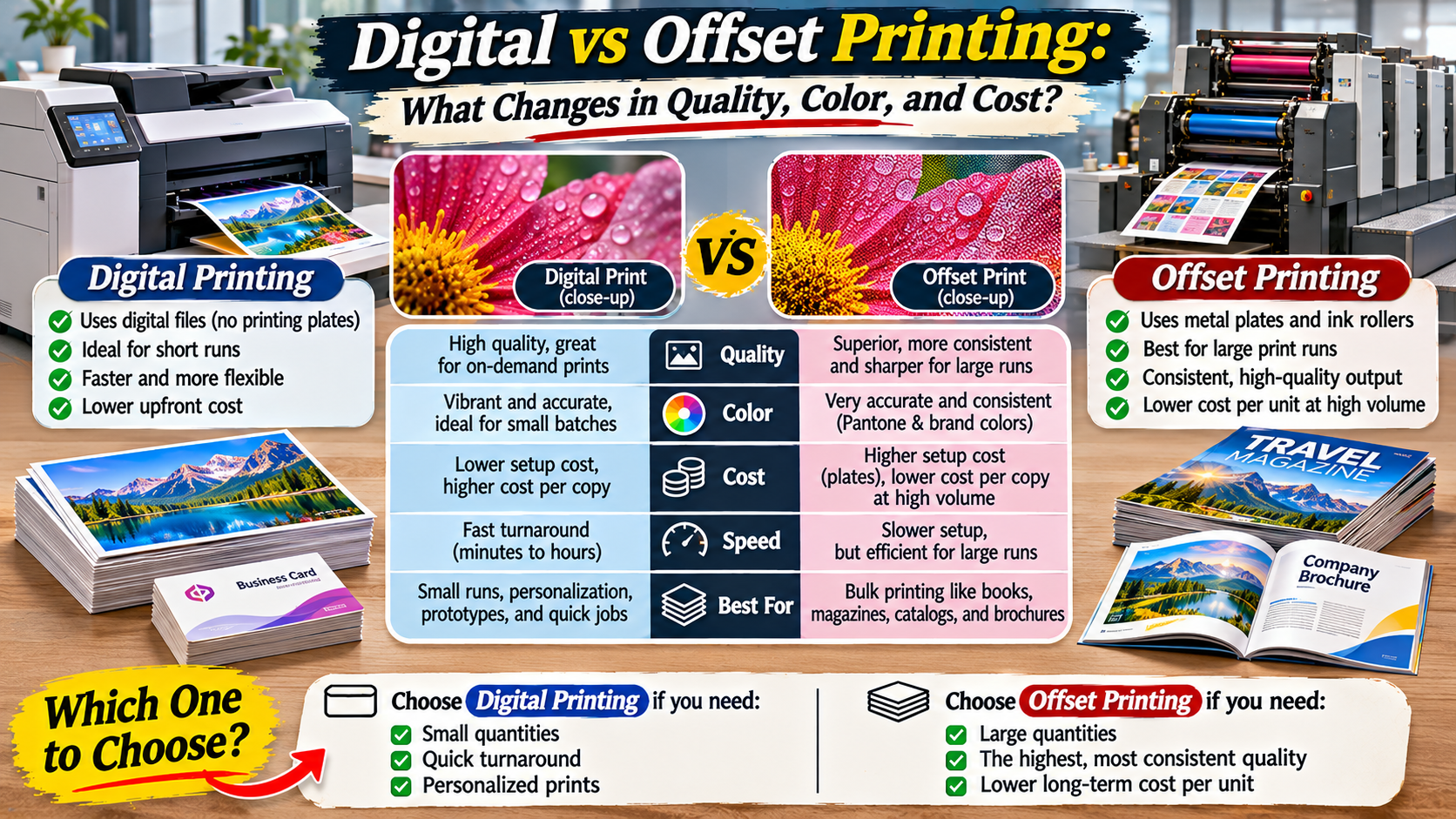
Digital printing transfers an image to paper or another substrate directly from a digital file, without requiring a conventional printing plate for each image.
Offset printing uses plates to transfer ink onto a rubber blanket, which then transfers the image onto the printing surface.
These differences influence setup time, production speed, color options, and overall cost.
Digital printing is often practical for shorter runs and personalized materials, while offset printing can become more economical for larger quantities and offers extensive options for specialized inks and precise production control.
However, neither method is automatically better for every project.
The right choice depends on what you are printing, how many copies you need, and which details matter most.
What Is Digital Printing?
Digital printing produces printed images directly from electronic files.
Unlike traditional offset lithography, it does not require a separate physical printing plate for every image.
Commercial digital presses commonly use toner-based electrophotographic technology or inkjet systems.
Toner-based presses use electrically charged imaging components to position toner, which is then transferred and fixed to the printing surface.
Inkjet presses deposit controlled droplets of ink onto the substrate.
The precise process depends on the equipment and ink technology.
Because the image is generated digitally, content can change from one sheet to the next.
This makes digital printing especially useful for personalized marketing, variable-data printing, short-run books, and small batches of promotional materials.
Advantages of Digital Printing
Digital printing generally requires less initial preparation than offset printing.
Files can often move into production quickly.
Small quantities can be printed without the expense of manufacturing offset plates.
Digital workflows also make it easier to personalize individual copies.
For example, a company can print invitations with different customer names or produce several versions of a promotional flyer without creating separate sets of plates.
Modern digital presses can deliver excellent text reproduction, photographs, and graphics.
However, quality and color capabilities vary considerably between entry-level printers and high-end commercial digital presses.
PRODUCTION PROFILE / DIGITAL
Fast Setup. Flexible Quantities. Personalized Output.
Typical strengths: Short runs, quick changes, variable information, and on-demand printing.
Setup requirements: Digital file preparation, press calibration, and suitable substrate selection.
Best fit: Projects where flexibility and relatively low initial setup costs are priorities.
What Is Offset Printing?
Offset printing is a widely used commercial printing process based on lithography.
In conventional sheetfed offset printing, the image is first transferred from a printing plate onto a rubber blanket.
The rubber blanket then transfers the inked image onto paper or another suitable substrate.
The term offset refers to this indirect transfer.
Traditional offset lithography relies on the different behavior of ink and water on the printing plate.
Image areas accept ink, while non-image areas are kept ink-repellent through the press’s dampening system.
Waterless offset systems also exist and use a different plate technology.
Offset printing requires additional preparation, including plate production, press setup, registration adjustments, and color balancing.
These steps increase initial costs.
Once the press is properly configured, however, it can produce large quantities efficiently.
Advantages of Offset Printing
Offset printing is particularly well suited to longer production runs.
The fixed setup cost is distributed across a greater number of copies as quantity increases.
Offset presses can reproduce detailed images and consistent colors when properly calibrated and maintained.
They also offer a wide range of ink systems, coatings, paper stocks, and finishing options.
Spot-color inks can be especially useful for brand identities that require carefully controlled colors.
Offset printing remains common for magazines, packaging, catalogs, books, and large promotional campaigns.
PRODUCTION PROFILE / OFFSET
Higher Initial Setup. Efficient Volume Production.
Typical strengths: Large quantities, extensive ink options, and established high-volume production workflows.
Setup requirements: Plates, press preparation, registration, and color adjustments.
Best fit: Projects where substantial print volume justifies the preparation costs.
Digital vs Offset Printing: What Changes in Print Quality?
Print quality is one of the most common concerns when comparing these methods.
Historically, offset printing was often considered the preferred option for demanding commercial reproduction.
However, modern digital presses have improved substantially.
For many everyday applications, the visual differences between professionally produced digital and offset prints can be difficult to notice.
Both methods can reproduce sharp text, detailed photographs, and complex graphics.
The actual result depends on press technology, resolution, screening, paper quality, file preparation, calibration, and finishing.
Text and Fine Details
Offset presses can produce excellent fine-line detail and consistent typography.
High-quality digital presses can also reproduce small text and intricate graphics effectively.
Problems such as blurry text or jagged edges are not necessarily caused by the printing method.
They may result from low-resolution artwork, unsuitable export settings, or poor equipment maintenance.
Photographs and Gradients
Both technologies can reproduce photographic images well.
Offset printing offers established screening methods and extensive process control.
Digital printing quality depends on factors such as toner or ink behavior, screening technology, and substrate compatibility.
Smooth gradients, delicate skin tones, and large areas of uniform color should be evaluated using actual press proofs when quality is critical.
The best way to compare print quality is to inspect samples produced on the intended equipment and paper—not to assume one technology always wins.
Color Accuracy: CMYK, RGB, and Spot Colors
Color reproduction is often more complicated than print sharpness.
Computer screens display colors using emitted light, usually represented through RGB values.
Most commercial color printing relies on combinations of cyan, magenta, yellow, and black.
This system is commonly called CMYK.
Because screens and printed surfaces produce color differently, some bright screen colors cannot be reproduced exactly with standard process inks.
Color management helps translate digital artwork into a printable result.
Both digital and offset workflows may use ICC profiles, calibrated equipment, and proofing systems to improve consistency.
Why Offset Printing Can Be Useful for Brand Colors
Offset printing commonly supports dedicated spot-color inks.
These inks are mixed to specified formulations rather than created solely through overlapping CMYK process colors.
Systems such as Pantone provide standardized color references used in design and production.
Spot colors can be valuable when a business needs a particular brand color across large quantities of printed materials.
However, spot-color accuracy still depends on the substrate, ink formulation, press conditions, and viewing light.
Can Digital Printing Match Pantone Colors?
Many digital presses simulate spot colors using CMYK or expanded-gamut ink and toner systems.
Some specialized digital equipment also supports additional colors or dedicated inks.
Whether a particular color can be matched accurately depends on the press’s available color gamut and production settings.
For critical brand work, request a physical proof and compare it under appropriate lighting.
COLOR PRODUCTION LAB / FOUR PROCESS INKS
CYAN
MAGENTA
YELLOW
BLACK
Both digital and offset printing commonly use CMYK, but their inks, imaging systems, substrates, and calibration processes can produce different results.
Cost Comparison: Why Print Quantity Matters
Printing costs are influenced by two broad categories: preparation costs and production costs.
Digital printing usually has relatively low initial setup costs.
However, the cost per printed sheet may remain comparatively high as quantities increase.
Offset printing typically requires greater initial investment because plates and press setup are necessary.
Once production begins, the incremental cost per copy can be lower, especially for long runs.
This creates a quantity-dependent cost comparison.
For a small batch of brochures, digital printing may be less expensive.
For thousands of identical brochures, offset printing may become more economical.
The exact crossover point varies with paper size, number of colors, finishing requirements, equipment, labor, and local print-shop pricing.
An Illustrative Cost Example
Consider a simplified example of two printing methods.
Suppose a digital printer charges a $20 setup fee plus $0.40 per copy.
An offset printer charges a $300 setup fee plus $0.12 per copy.
These numbers are hypothetical and are intended only to explain the cost relationship. They are not current market quotations.
| Print Quantity | Illustrative Digital Cost | Illustrative Offset Cost | Lower Cost |
|---|---|---|---|
| 100 copies | $60 | $312 | Digital |
| 500 copies | $220 | $360 | Digital |
| 1,000 copies | $420 | $420 | Equal |
| 2,500 copies | $1,020 | $600 | Offset |
| 5,000 copies | $2,020 | $900 | Offset |
In this example, the total costs are equal at 1,000 copies.
Real quotations may cross over at a much smaller or larger quantity.
Always compare the complete quoted price, including paper, finishing, delivery, and taxes where applicable.
Turnaround Time: Which Method Is Faster?
Digital printing often provides faster turnaround for small and straightforward jobs.
Because conventional printing plates are unnecessary, production can begin after the file has been checked and the press is ready.
This is useful for last-minute marketing materials, short-run presentations, and urgent event programs.
Offset printing requires more preparation.
Plates must be produced, the press must be configured, and the printing process must be adjusted.
For large quantities, however, offset presses can operate at very high production speeds.
Therefore, the fastest method depends on the entire project.
A short digital run may finish sooner, while a long offset run may be more efficient once production is underway.
Finishing processes such as binding, folding, trimming, coating, and packaging can also affect delivery time.
Paper Types, Coatings, and Finishing Options
Paper selection can change the appearance of a printed design as much as the printing technology itself.
Coated papers often provide smooth surfaces that support detailed image reproduction.
Uncoated papers offer different textures and may absorb ink differently.
Heavy cardstock is common for business cards and packaging.
Both digital and offset printing can work with many substrates, but compatibility depends on the specific press.
Some digital presses have limitations involving paper thickness, surface texture, heat sensitivity, or sheet dimensions.
Offset printing also has equipment-specific restrictions, but commercial offset production offers extensive paper and ink options.
Special finishing can include embossing, foil stamping, spot coatings, lamination, and die cutting.
Many of these finishing processes can be combined with either printing method.
Always confirm the selected material and finishing combination with the print provider.
Personalization: Where Digital Printing Stands Out
Digital printing has a major advantage when every printed piece needs different information.
This capability is called variable-data printing.
For example, a business may want to produce 500 postcards with unique customer names and personalized promotional messages.
A digital workflow can change the content from one copy to the next.
Conventional offset printing is better suited to repeating the same image throughout a production run.
Changing printed content generally requires additional plate or production changes.
Digital printing is therefore particularly attractive for direct-mail campaigns, customized invitations, numbered documents, and personalized packaging.
Digital vs Offset Printing: Side-by-Side Comparison
| Feature | Digital Printing | Offset Printing |
|---|---|---|
| Initial setup | Usually lower | Usually higher |
| Short print runs | Often cost-effective | Setup can be expensive |
| Large print runs | Depends on equipment and pricing | Often more economical |
| Print quality | Excellent on suitable commercial presses | Excellent with proper process control |
| Spot-color options | Equipment-dependent | Extensive dedicated ink options |
| Personalization | Strong capability | Less flexible in conventional workflows |
| Small-job turnaround | Often faster | Requires more preparation |
| Paper compatibility | Depends on press technology | Broad commercial options |
Which Printing Method Should You Choose?
The best method depends on the practical requirements of the project.
Rather than choosing based on reputation, consider quantity, design complexity, color requirements, personalization, and delivery deadlines.
PRINT PRODUCTION / DECISION GUIDE
Small runs often favor digital printing; larger runs may justify offset setup costs.
Identify whether standard process color is sufficient or a specific spot-color ink is required.
Digital printing is generally more convenient when individual copies contain different information.
Make sure the chosen production method supports your material and finishing requirements.
Review total cost, proofs, production time, delivery, and expected quality before ordering.
Real-World Printing Examples
Business Cards
Digital printing may be suitable for a few hundred business cards, especially when different employees need personalized information.
Offset printing may be attractive for large quantities of identical cards or projects requiring specific ink and finishing combinations.
Marketing Brochures
A small business ordering a few hundred brochures may benefit from digital printing’s lower setup costs.
A company distributing tens of thousands of identical brochures may find offset printing more economical.
Books and Magazines
Digital printing supports short-run publishing and print-on-demand workflows.
Offset printing remains useful for larger book and magazine production runs.
Product Packaging
Digital printing can be practical for prototypes, limited editions, and customized packaging.
Offset printing may be appropriate for large packaging orders requiring consistent production across many identical units.
Common Mistakes When Ordering Printed Materials
One common mistake is assuming that a high-resolution screen preview guarantees excellent print quality.
Printed results depend on the source file, color management, paper, and press settings.
Another mistake is choosing the cheapest quote without checking what is included.
Some quotations may exclude shipping, finishing, proofs, or other production services.
Designers may also overlook bleed and trimming requirements.
Bleed extends artwork beyond the final trim edge so that minor cutting variations do not leave unwanted white borders.
Another issue is expecting RGB screen colors to reproduce exactly in print.
For important jobs, ask the printer about suitable color profiles and proofing options.
Finally, avoid assuming that digital printing is always lower quality or that offset printing is always more expensive.
Both assumptions overlook the importance of quantity, equipment, and project specifications.
Frequently Asked Questions
Is offset printing better quality than digital printing?
Not necessarily. Both can produce excellent results. Quality depends on the press, paper, artwork, calibration, and production controls.
Which is cheaper: digital or offset printing?
Digital printing is often cheaper for small quantities, while offset printing may become more economical for larger identical runs.
Is digital printing good for photographs?
Yes. Modern commercial digital presses can reproduce high-quality photographic images when suitable files and materials are used.
Which printing method is best for Pantone colors?
Offset printing offers extensive options for dedicated spot-color inks. Digital presses may simulate or reproduce specified colors depending on their capabilities.
Why does offset printing cost more to set up?
Conventional offset printing requires plates and press preparation before the production run begins.
Which printing method is faster?
Digital printing is often faster for short jobs, while offset printing can be efficient for high-volume production after setup.
Can digital printing produce personalized materials?
Yes. Variable-data printing allows text and images to change between individual printed copies.
Final Thoughts
Digital and offset printing are both valuable technologies in modern commercial production.
Digital printing offers flexible quantities, relatively low initial setup costs, and convenient personalization.
Offset printing provides efficient high-volume production and extensive options for specialized inks and materials.
Neither method guarantees superior quality in every situation.
Professional results depend on careful file preparation, appropriate substrates, color management, and reliable production equipment.
For smaller projects or frequently changing designs, digital printing may be the practical choice.
For large runs of identical materials, offset printing may offer better overall economics.
The most effective decision comes from comparing the complete requirements of your project rather than focusing on a single feature.
When quality, color, quantity, and cost are considered together, choosing the right printing method becomes much easier.